


.svg)

NEW Game Builder Experience
More control of your content creation and training effectiveness with our reimagined Game Builder.
The Training Arcade®’s latest updated Game Builder removes friction and makes iteration easy.
Letting creators focus on what matters most: meaningful content and engaging experiences.
What’s New!
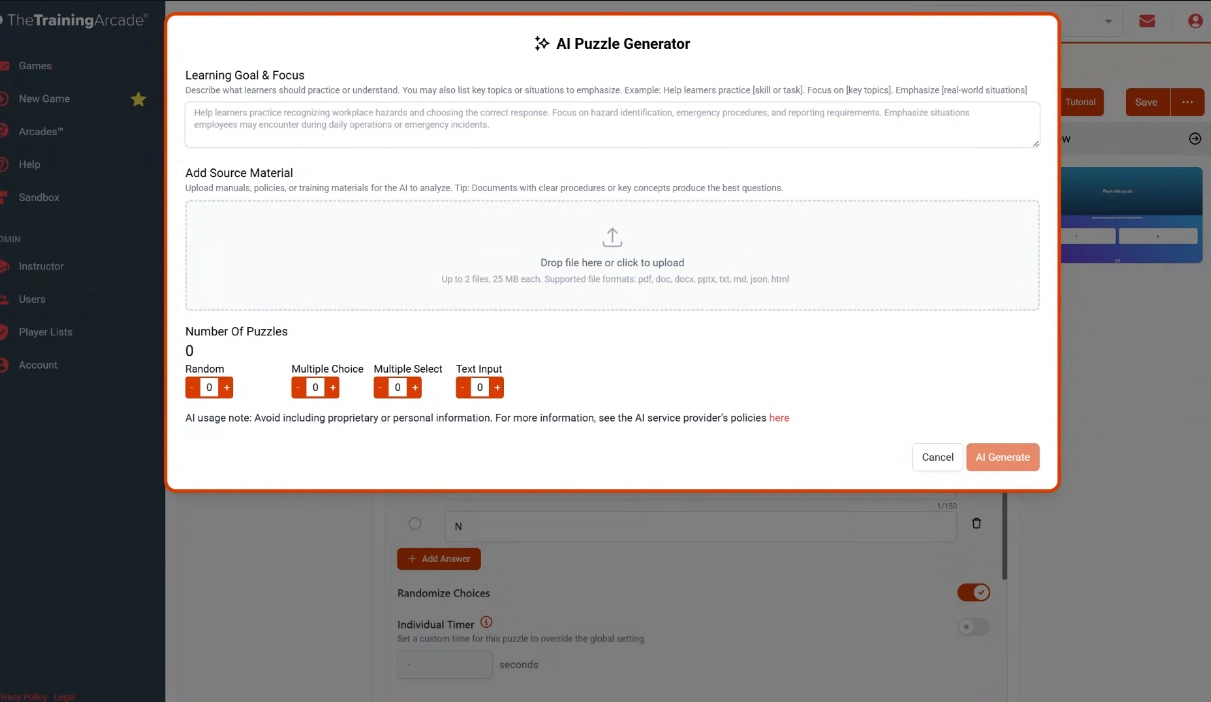
AI-Powered Puzzle Generator
Upload up to 2 source documents (up to 25MB each) to instantly generate accurate puzzles based exclusively on your content.
A Smarter, Faster Game Builder
We’ve completely reimagined the Game Builder experience to make it more intuitive from the moment you open it.
- A flexible, resizable layout that adapts to how you work

- Clear organization by intent: Theme, Puzzles, Settings, Play, and Translations
- Optional features are visible in a disabled state, so you can understand what’s available without adding complexity.
- Smart Defaults: Most settings now include pre-configured defaults, helping you get started quickly and reduce setup time.
Everything is where you expect it. Less searching, less second-guessing, more building.
Real-time preview

Changes appear immediately as you build, giving you instant feedback on how your game will look and behave.
Test Mode Arrives in the Builder

You can now launch Jeopardy! and Trivia in Test Mode right from the Game Builder, making it easy to validate gameplay without affecting analytics or creating sessions.
We’ll be expanding Test Mode across all game types in coming releases.
Improved guidance
Enhanced tooltips and in-context guidance help you understand settings and make decisions faster.
Built with a Stronger Foundation
Behind the scenes, we’ve modernized the platform to support:
- A faster, more responsive experience
- Improved stability and scalability
- Enhanced security and future-ready architecture
Accessibility, Across the Experience
We’re continuing to enhance accessibility across the platform, with updates to both the Game Builder and our games. Improvements include better color contrast, refined visual options, and core code updates to support more users.
More enhancements are coming soon.
Additional Improvements
All-Time Date Filter Added
You can now select an “All Time” option in CMS date pickers, making it easier to view data without date restrictions.
Improved Search with Fuzzy Matching
Search is now more forgiving and flexible. Our updated search bars can better handle character variations, helping you find what you need faster.
Eήầḇĺėd fǚẑᶎγ şέẵгċħ ƒõř ôµя šěᾶѓɕђ bāѓś ŧø fιήd τђīńᶃș ώìтĥ ųńǚşǔάł ꞓĥᾶѓἆ¢țēґş
Improved guidance
Enhanced tooltips and in-context guidance help you understand settings and make decisions faster. We’ve also refined the Arcade Awards experience to make it easier to understand, configure, and deploy. Clearer guidance means you can take advantage of awards with confidence.
Manage Notifications in One Click
If your inbox has been getting busy, this one’s for you.
You can now dismiss all platform notifications at once, a simple quality-of-life improvement that keeps things tidy and focused.
Clearer Reporting Timezones
- Reports now display the timezone used directly within the report
- By default, reports are generated in UTC
- If you’ve set a preferred timezone in your profile, reports will reflect that instead
Stronger foundation
Behind the scenes, backend updates improve performance, security, and scalability, creating a faster, more reliable experience today and a stronger foundation for what’s next.
Previously released
Leaderboards
You can now disable both the Global (XP) Leaderboard and/or the Game Leaderboards within the Arcade > Settings.

Activities improvements
Activities within a Mission or Journey can now be linear (completed in order) or nonlinear (completed randomly, players choice).
How To:
Missions - modify the “Require completion of activities in order” on/off toggle.
Journeys - modify the “Require completion of activities in order” on/off toggle for each of the Stages.
Option added, authors have control over whether players can ‘restart’ Missions or Journeys.
How To:
Missions – toggle the “Allow players to restart Mission?” on or off
Journeys – toggle the “Allow players to restart Journey?” on or off
In the Mission and Journey settings, authors can also now ‘Restart a Mission or Journey by Player’, and/or set a date in which a Mission or Journey would ‘restart’.
Journey Stage titles can now be customized.
Previous stages were numbered, 1, 2, 3, etc. In existing Journeys, they now appear as Stage 1, Stage 2, Stage 3, etc. which are now editable titles.
Improved labeling when adding SCORM files into Mission and Journeys.
Log in now to explore the latest updates.
New to Gamified Learning Experiences? Request a live demo to see how great training games aren’t just about play; they’re about learning that sticks.


