


.svg)

More Control, Better Insights
Create training your team can do anywhere, customize the dynamic AI interactions, and get a better understanding of your data.
Text Link
This is some text inside of a div block.


The latest Rehearsal update streamlines the way you manage and deliver AI Roleplay learning opportunities.
By modernizing our reporting stack and introducing granular access controls, we’ve made it easier for managers to track skill growth while maintaining full confidence in privacy. New Session features, such as AI Avatar greetings and audio-only modes, ensure your training is both realistic and accessible to your workforce.
Key Updates:
Roleplay Manager Dashboard v2:
Managers can now sort any table column, export dashboard data to CSV, and share dashboard access with non-admin users through a structured permission model.
Recording Mode setting:
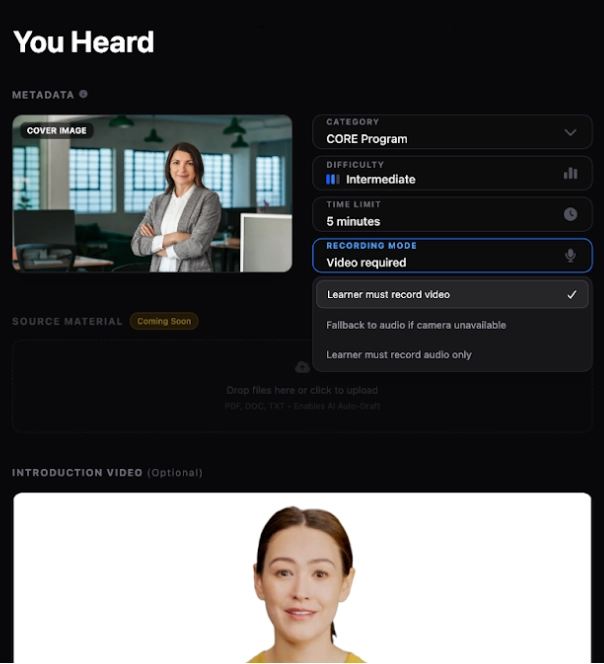
A new "Recording Mode" option is available in the Environment editor with three values:
- Learner must record video — existing default behavior, unchanged
- Fallback to audio if camera is unavailable — attempts camera first; switches to microphone-only if camera access is denied or unavailable
- Learner must record audio only — camera is never requested; microphone only
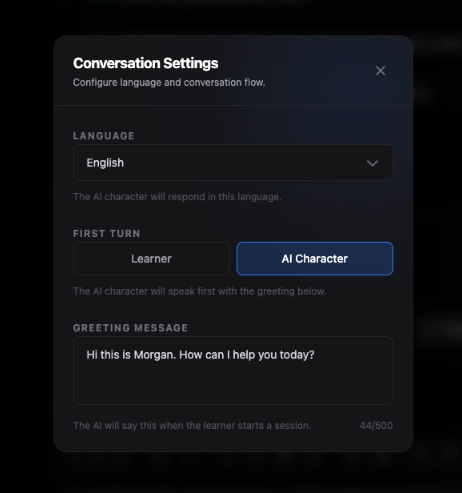
- Avatar Greetings: You can now enable an AI persona to speak a predefined opening line at the start of a Session.
- Report Modernization: The Rehearsal Assignment Report has been rebuilt for improved performance and UI/UX.
Log in now to explore the latest updates.
New to Rehearsal? Request a live demo or watch a video walkthrough and see how this AI-powered video and audio-based coaching platform can transform your learning!
Connect


