


.svg)

Collaborative Editing, Startup Modules, Dashboard Enhancements
New features to build together, faster onboarding, and manage modules with ease.
What’s better than building great content? Building it together.
We’re excited to announce a game-changing update to MicroBuilder®—bringing collaborative editing and sharing to make teamwork on learning modules seamless and efficient.
And that’s just the beginning.
This October release also introduces powerful new capabilities—from smart onboarding tools, guided in-app help, a redesigned dashboard, and AI-powered module labeling — all designed to make content creation faster, smarter, and easier to manage at scale.
New Features & Enhancements

1. Seamless Multi-Author Collaboration
Build and edit learning content together — in real time or asynchronously.
- Role-based permissions:
- “Owner” – full control, publish & delete
- “Collaborator” – edit & comment
- “Reviewer” – view & comment only (ideal for external QA and compliance)
- Block-level live locking prevents conflicting edits and shows who is editing each block.
- In-line and panel comments with @mentions, notifications, and a centralized comment panel for easy tracking and resolution.
- Secure external review helps send encrypted, time-limited links to reviewers outside your organization.

2. Startup Modules for Faster Onboarding
Get new users building faster with pre-loaded, editable sample modules.
- New authors see ready-made demo modules at first login.
- Modules can be duplicated, modified, or deleted — no risk to original templates.
- Eliminates the “blank dashboard” barrier and accelerates adoption.
3. Enhanced UX Dashboard
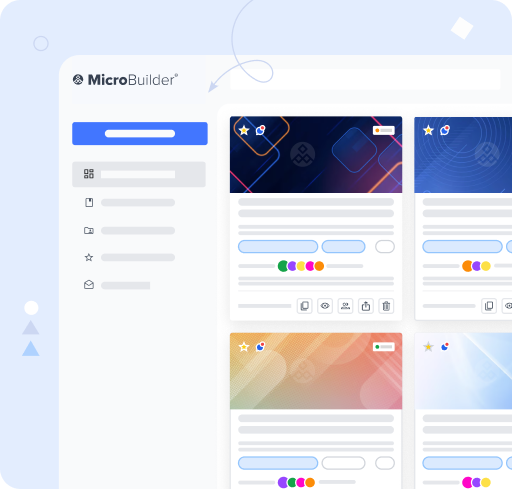
A redesigned, more intuitive dashboard for efficient content management.
- Left-menu filters: All Content, My Content, Shared with Me, Favorites, Drafts.
- Responsive tile & list views with key details — status, contributors, views, timestamps.
- Favorite modules for quick access and better workflow organization.
4. Smart Module Labelling
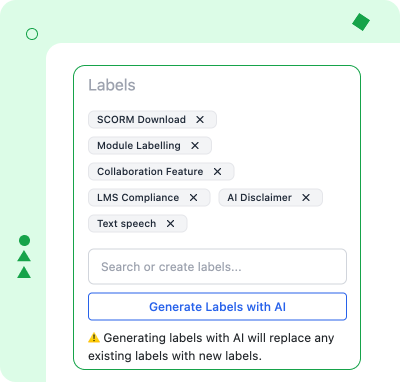
Keep your content organized at scale.
- Add up to 10 manual labels or let AI suggest up to 4 relevant labels per module.
- Search and filter content easily with label-based organization.
5. “What’s New” Popup
Stay up to date effortlessly.
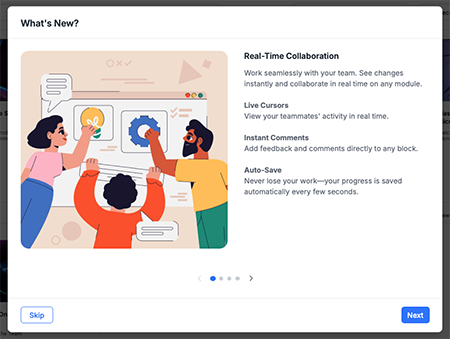
- A simple, visual pop-up introduces new features whenever you log in after an update.
- Highlights key additions with titles, short descriptions, and screenshots for quick understanding.
- Displays automatically on first launch after a release — so you always know what’s new.
- Supports single-feature or multi-feature (carousel) formats, allowing users to browse updates at their own pace.
6. Guided On-Screen Help
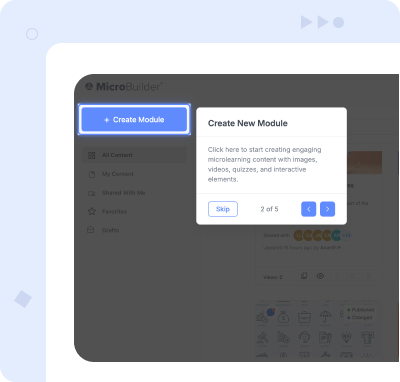
Help your team master MicroBuilder from day one.
- Contextual in-app prompts highlight essential features such as Create Module, Search, and Add New Block.
- Easily dismiss help once you’re familiar with the platform.
Start using these updates in your account. Log in now.
New to MicroBuilder®? Get a 30-day free trial to create engaging and interactive learning in minutes (no authoring experience needed).


