


.svg)


New Feature
Reset Specific Variables With Precision
The new Reset Variable action gives you fine-grained control over project data. Now, you can choose to reset only the variables you want. The rest of your course logic stays untouched. This makes testing interactions, resetting quiz variables, or designing a replay button for a single section easier. With this update, you can:
- Pick exactly which variable to reset: Choose from user-defined or system-reserved variables, such as question or form variables.
- Prevent data loss: Avoid the unintended side effects that occurred with the older “Reset All Variables” action.
- Save time: Skip building workarounds with multiple “Modify Variable” actions or manual value resets.
- Apply anywhere: Use it on buttons, groups, menus, hyperlinks, or triggers such as page show, device rotation, or object visibility.
- Test accurately: Works seamlessly in both Run mode and published content, so testing and production behave identically.
This improvement gives authors precise control over learning state management, making complex course designs easier to build, test, and maintain.
Workflow and Design Improvements
Project Explorer Sync Toggle
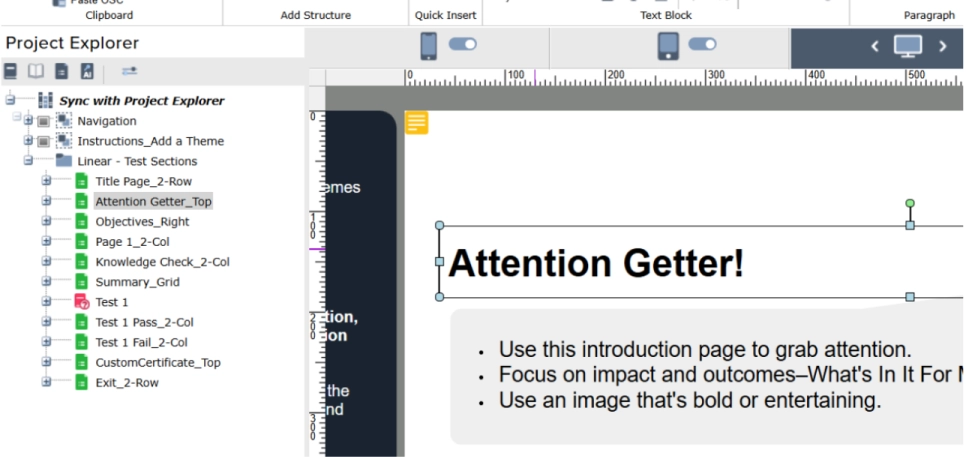
Speed up your authoring flow with the new Project Explorer Sync Toggle! You now control when the Project Explorer expands to show all elements on the page.
Use the new Sync icon to turn this feature on or off:
- On: The Project Explorer Expands automatically when you select objects.
- Off: Your current view stays put helping you focus, especially on large projects where automatic expansion can slow things down.

Better Button Customization
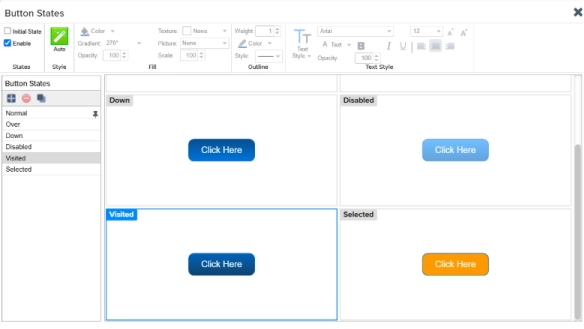
New options for button Flip, Rotation, and Enable states. Enhanced button customization allows the same button to be adjusted for mobile and desktop views.
A new Enable option is available for Visited, Selected, and Custom button states that gives you full control over when each state is used, or not used, in your design.
Change Contents Styling
New options for applying custom styling to the text you replace, giving you more control over the look of your content.

New Convenience Feature
Published content now automatically includes comment tags with the project name and publish date/time. This makes it easier to trace where a published file came from.
These new features (and other enhancements) help simplify development and enhance interactivity, giving you more creative control over your content creation. Read the full release notes here to learn more about the update.
Log in now to see Lectora Online's newest update.
New to Lectora? Get a free trial and try out this powerful, accessible authoring tool.


